Downloads
Video Car / IoT Car Source Code
ESP32 source code for V3 and V5 cars
- Standard Bluetooth remote + IoT remote - 4-wheel car
- Single-hand RC remote - 4-wheel car
- Two-hand RC remote - 4-wheel car
Arduino Uno Driver Board Factory Source Code
Arduino driver board source code for V2 and V3 cars
VSCode + PlatformIO Development Environment Setup
1) Install the Driver
Since the computer needs to communicate with the board, a serial port driver must be installed.
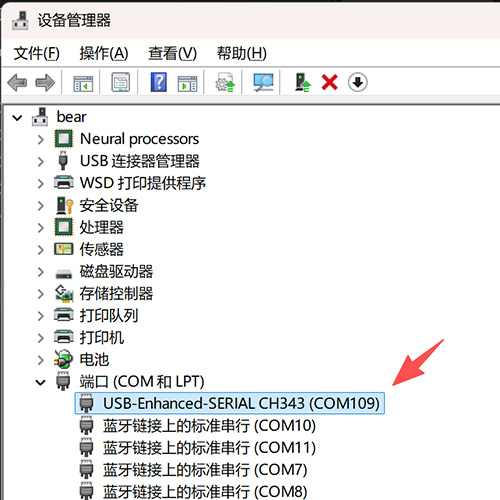
After downloading, unzip and install. Click "This PC" -- "Properties" -- "Device Manager"; if it displays as shown below, the installation was successful.
2) Install Python
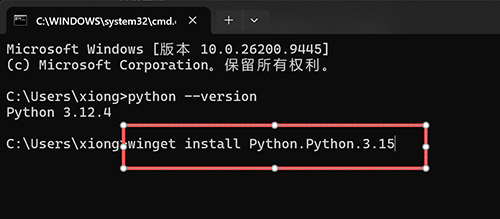
winget install Python.Python.3.15
If the version number can be queried, the installation was successful.
python --version
3) Install VSCode
Download and install; the interface will look like the image below after opening.
4) Install PlatformIO
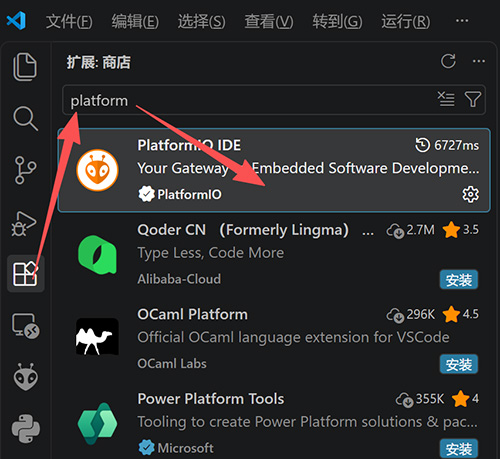
As shown below, first open the extensions panel, type "Platform" in the search box, and install the extension with the ant head icon.
5) Open a Project
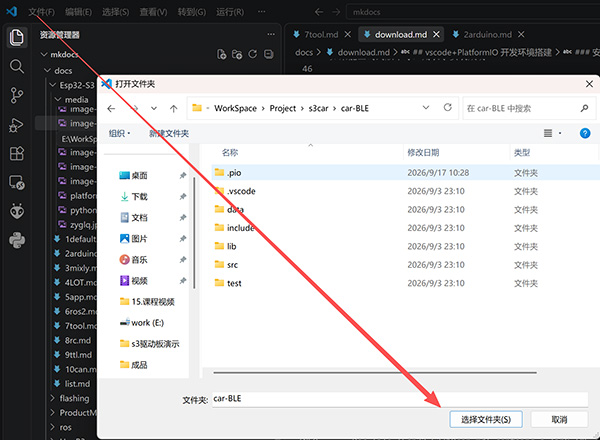
Top-left menu: File -> Open Folder -> select the source code folder (select a folder, not a file)
6) Compile and Upload
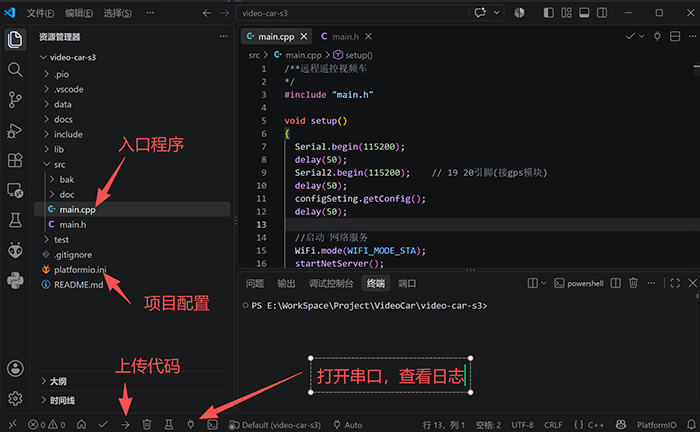
There are many necessary comments in the code; if needed, you can have AI explain and improve the code.